TRP Voice Webphone Unregistered Status in Microsoft Edge
✅ Solution: Disable Tracking Prevention for the Site
To resolve the issue:
In Microsoft Edge, visit the TRP Voice webphone portal
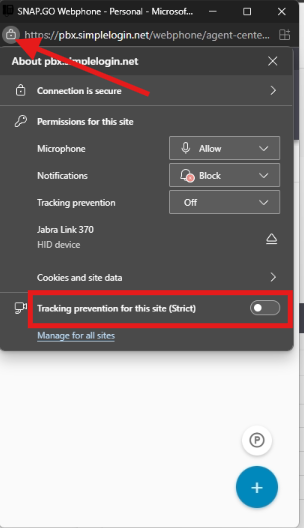
Click the lock icon to the left of the address bar.
In the site permissions panel that appears, scroll to "Tracking prevention for this site (Strict)".
Toggle the switch to off disable tracking prevention for this site.
Refresh the page or restart your browser if necessary
Note: This guide applies specifically to Microsoft Edge. While similar behavior may occur in Google Chrome, the steps and terminology may differ slightly.
Related Articles
TRP vFax User Guide
TRP vFax User Guide
TRP vFax Security Details
TRP vFax: Industry-Leading Security Standards TRP vFax is built for secure and compliant faxing, meeting or exceeding the strict requirements of HIPAA, GLBA, SOX, and PCI. By leveraging the Google Security Model, TRP vFax employs the same ...
Grandstream GXP2170
Grandstream GXP2170 Carrier-Grade HD IP Phone Below you will find the official manuals and guides for your device. Click the links below to download the PDF files: Quick Installation Guide Admin Guide User Guide Quick User Guide Security Manual VLAN ...
Grandstream GRP2616
Grandstream GRP2616 Carrier-Grade HD IP Phone Below you will find the official manuals and guides for your device. Click the links below to download the PDF files: Admin Guide User Guide Bluetooth Guide Quick Installation Guide Quick User Guide ...
Grandstream GXV3350
Grandstream GXV3350 Carrier-Grade HD IP Video Phone/ Android Below you will find the official manuals and guides for your device. Click the links below to download the PDF files: Admin Guide Bluetooth Guide Security Manual Quick Installation Guide ...